All the posts about Fabric Framework are under tag "fabric-framework".
I started working on a Fabric Framework. in few words this is:
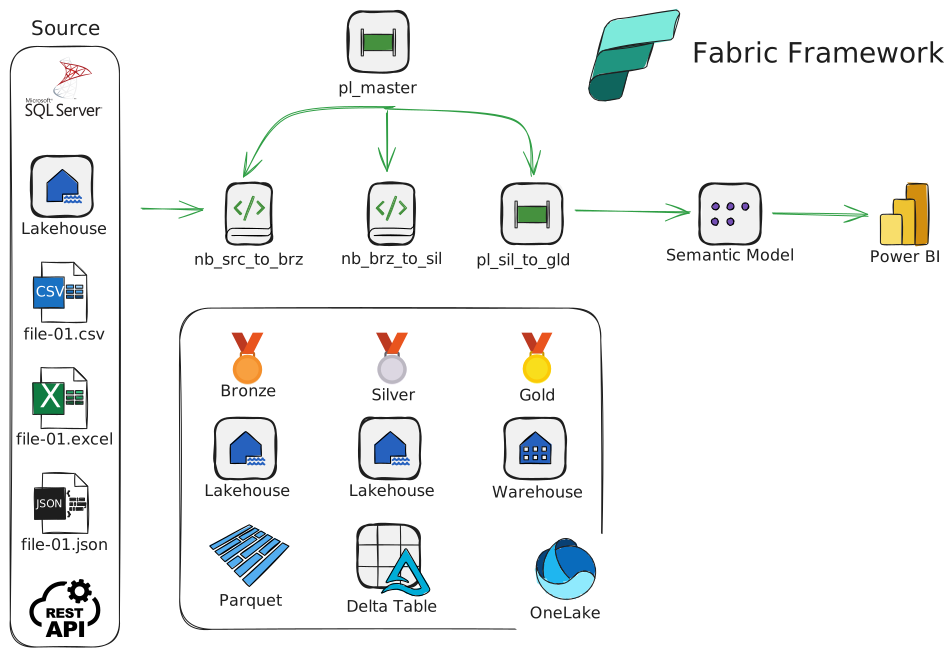
- Fully automated and parametrized data ingestion Fabric solution, based on Medallion architecture
- Еasily reproducible for new clients. In most of the cases only editing of the configuration and extraction tables is needed
- Driven by data in tables (configuration, extract object, schedule, etc.)
- Ingest data from various sources (SQL Server, Lakehouse, Excel, CSV, JSON, API, etc.)
- Creates dynamically bronze, silver and gold layers
- Schedule each ingested object – hourly, daily, weekly, monthly, quarterly, yearly
- Refresh semantic models (Data Warehouse)
- Send execution reports (success, error) by email
Diagram
Repository
You can find an early version of the source code in GitHub.
Dataflow
The starting point is an hourly scheduled pipeline “pl_master” that:
- Generates parameter process_timestamp – the unique identifier of the current execution across all the solution
- Reads the global parameters from table
- Excecutes Notebooks:
- nb_bronze_master
- nb_silver_master
- nb_gold_master
- nb_power_bi_master
- nb_report_master
- Runs “if” conditions:
- if_send_success_email
- if_send_error_email
Folders and Files
The files in this project are organized as follow:
/bronze --> All the objects, related to the bronze layer
	/test --> Notebooks to test the bronze notebooks
		nb_bronze_function_extract_csv_test.ipynb
		nb_bronze_function_extract_excel_test.ipynb
		nb_bronze_function_extract_json_test.ipynb
		nb_bronze_function_extract_lakehouse_sql_server_test.ipynb
		nb_bronze_function_test.ipynb
	nb_bronze_function.ipynb --> Functions, Related to the Bronze layer
	nb_bronze_function_extract_api.ipynb --> Extract from REST API
	nb_bronze_function_extract_api_pl.ipynb --> Extract from REST API
	nb_bronze_function_extract_csv.ipynb --> Extract from CSV
	nb_bronze_function_extract_excel.ipynb --> Extract from Excel
	nb_bronze_function_extract_json.ipynb --> Extract from JSON
	nb_bronze_function_extract_lakehouse_sql_server.ipynb --> Extract from SQL Server
	nb_bronze_master.ipynb --> The master notebook for Bronze. Called from "pl_master"

/gold
	nb_gold_master.ipynb --> The master notebook for gold. Called from "pl_master"

/one_time_exec - Initialization code
	extract_schema_table_column_from_src_server.sql - Extract the data, needed in configuration.xlsx, related to on-prem SQL Server
	configuration.xlsx --> All the configuration for the framework. Paste this file in OneLake "lh_cfg/Files"
	pl_one_time_exec_master.json --> Create and populate the initial objects
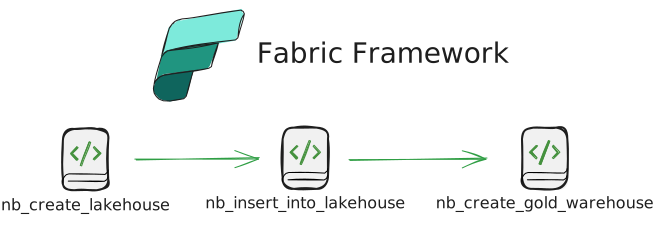
	nb_create_lakehouse.ipynb --> Create:
		Lakehouses (cfg, log, bronze, silver, shortcut_1, other)
		ABFS paths
		Tables (extract object, extract parameter, power bi refresh, metadata, log, schedule, etc.)
	nb_insert_into_lakehouse.ipynb --> Transfer the data from "configuration.xlsx" to the framework system tables
	nb_create_gold_warehouse.ipynb --> Create warehouse gold

pl_master (hourly triggered pipeline)
	get_global_parameter --> Read from "lh_cfg.dbo.global_parameter"
	nb_bronze_master.ipynb --> Call "bronze/nb_bronze_master.ipynb"
	nb_silver_master.ipynb --> Call "silver/nb_silver_master.ipynb"
	nb_gold_master.ipynb --> Call "gold/nb_gold_master.ipynb"
	nb_power_bi_master.ipynb --> Call "power_bi/nb_power_bi_master.ipynb"
	nb_report_master.ipynb --> Call "report/nb_report_master.ipynb"
	if_send_success_email --> Send success email(s)
	if_send_error_email --> Send error email(s)

/power_bi
	/refresh
		nb_refresh_dataset_2.ipynb --> Refresh Power BI Semantic Models
	/report (empty) --> Power BI Reports
	/semantic_model (empty) --> Power BI Semantic Models
	nb_power_bi_function.ipynb --> The functions, related to Power BI Refresh
	nb_power_bi_master.ipynb --> The master notebook for Power BI Refresh. Called from pl_master

/recovery --> Pipelines/Notebooks for disaster recovery
	Info.txt

/report --> Notebooks that create HTML report from lh_log and return it to the calling pipeline
	/test --> Notebooks to test the report notebooks
		nb_report_function_test.ipynb
	nb_report_function.ipynb --> Functions, used to create reports
	nb_report_master.ipynb --> The master notebook for Reports. Called from pl_master

/silver --> Notebooks, related to the silver layer
	nb_silver_function.ipynb --> Functions, Related to the Silver layer
	nb_silver_master.ipynb --> The master notebook for Silver. Called from "pl_master"

/system
	/test --> Notebooks to test the system notebooks
		nb_system_function_test.ipynb
	nb_system_cfg.ipynb
	nb_system_function.ipynb --> System functions, i.e. used in multiple layers (bronze, silver, etc.). Example: get now, insert into log, spark.sql, etc.

/working_files
	/sample_data --> Sample files to run ingestion tests
		/CSV
			/folder 16
				/other folder 27
					sample 2.csv
			/folder 35
				people.csv
			clients.csv
			customérs.csv
		/Excel
			/Other
				/Thing
					Third test.xlsx
			/Réference Data
				Test.xlsx
			/Other test.xlsx
		/JSON
			/folder 2
				pl_test_1_2.json
			pl_test_1_1.json
	/schedule
		schedule_config_table.ods --> Future table for schedules to replace "Frequency" logic
	JSON Structure.xlsx --> Help to understand the structure and how to fill sheet *"Bronze (JSON) in file *"one_time_exec/configuration.xlsx
	Mirrored Azure SQL Database.txt --> How to use mirrored database in Fabric
I’ll explain each folder and file in the next posts.
Installation
- Create Fabric Workspace and dedicated user that will run the executions
- Replicate the GitHub repository in Fabric Workspace
- Run notebook “/one_time_exec/nb_create_lakehouse”
- Upload file “/one_time_exec/configuration.xlsx” to “lh_cfg/Files”
- Run notebook “/one_time_exec/nb_insert_into_lakehouse”
- Run notebook “/one_time_exec/nb_create_gold_warehouse”
- Open pipeline “pl_master” and add ah hourly schedule
Keep it simple :-)